Choosing a model
Cognos offers many models. Pick one by name, or filter by what you need — speed, reasoning, web search, or images.
1Pick a model
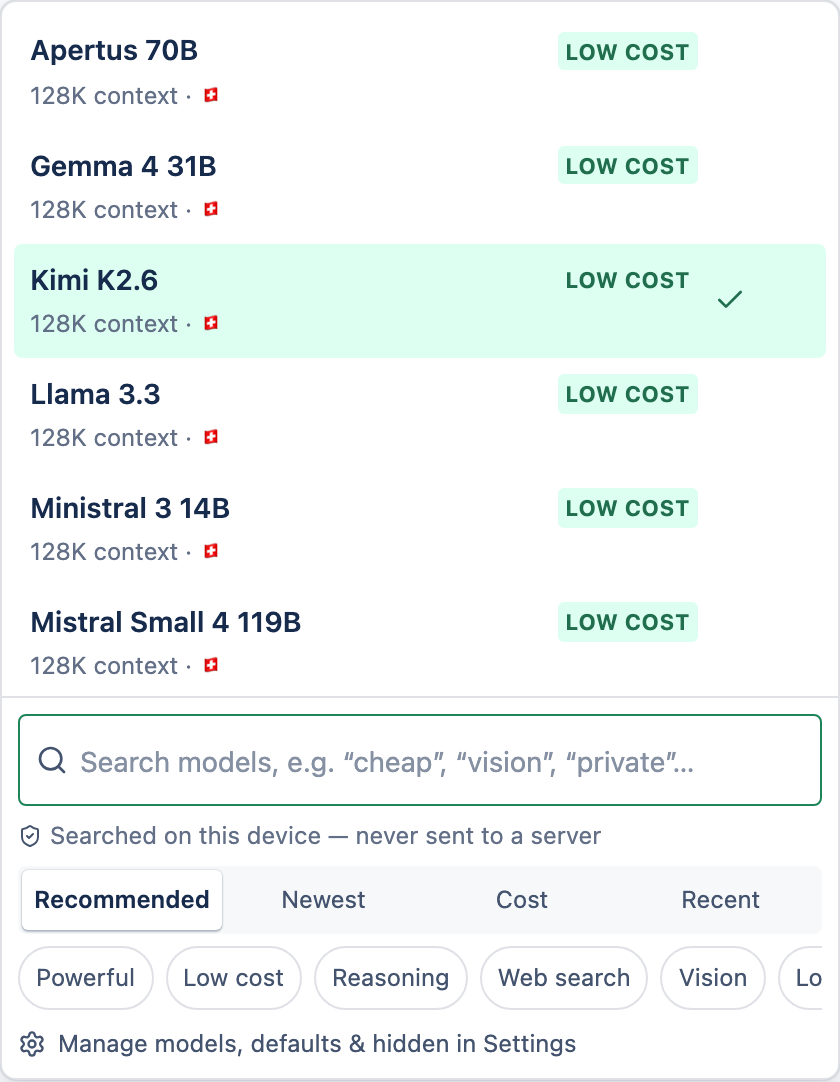
Open the model picker
Select the model name shown above the message box.
Find one
Browse Pinned, Recent and Recommended, search by name, or use the quick filters (Fast, Powerful, Reasoning, Web search, Image, Vision, and more).
Select it
Your choice sticks for new messages and follows you across devices.
2Model vs provider
The model is the choice you make. The provider is the company that actually runs it and sees your message while it answers. Cognos records the provider on each answer — you can check it any time in the per-answer privacy details.
3What a model can and can't do
- The picker only enables what a model actually supports — an image-only model can't hold a text chat, for example.
- Web search is quietly skipped on models that can't do it, rather than blocking your message.
- Your privacy tier limits which models you can use. Models above your tier appear greyed out so you can see what a higher tier would unlock.